

On this page
Returns & Exchanges
The queue
One row per order with a request. Filter pills: All, Requested, Approved, Rejected, Processed, Completed. The Status column shows the earliest stage among the order's lines, so a row stays on Requested until every line has a decision.
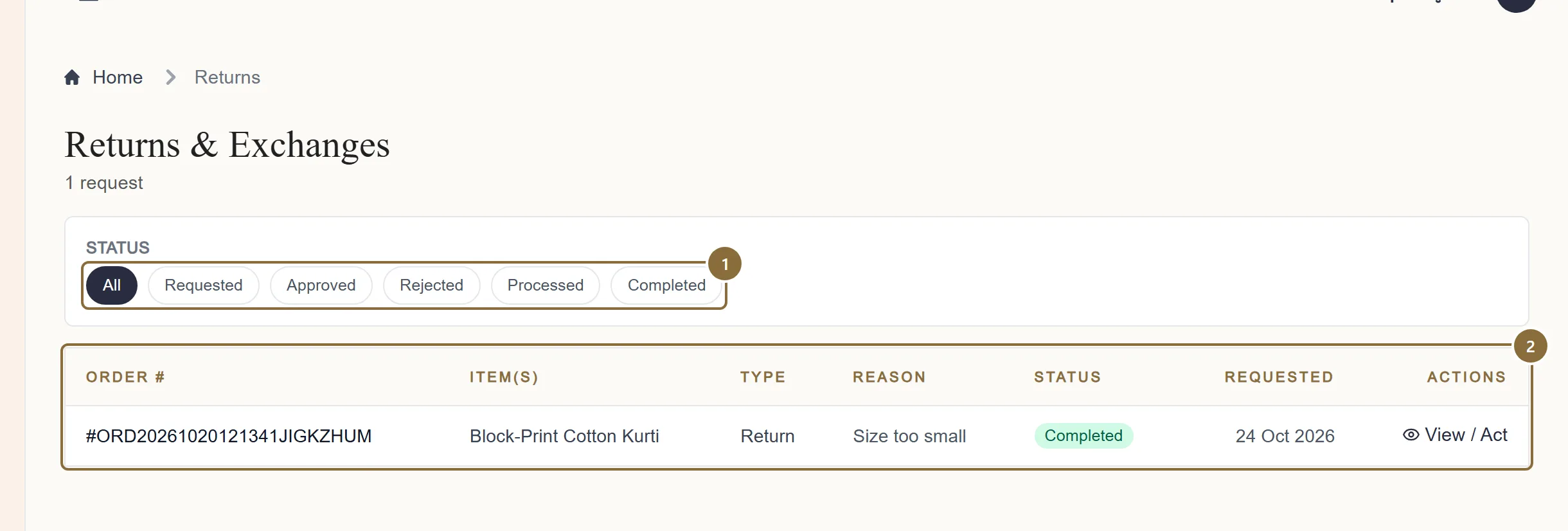
Status pills
Requested is what needs you.
The queue
One row per request: order number, Type (Return, Exchange, or both), the customer's reason with a count of further lines, and View / Act, which opens the request. Empty until a customer asks.
Return · Order #
The request
Each line shows the product and variant, quantity and price, a Return or Exchange pill, the reason, the customer's explanation, the requested replacement for an exchange, the status history, and the unboxing video. The banner reminds you: review the note and the video before deciding. The customer's bank details are never shown to you.
Reasons a customer can choose: damaged or defective item, wrong item delivered, item not as described, quality not as expected, size or fit issue, missing parts or accessories, other; for exchanges also "prefer a different colour or variant".
Return · Order # · line actions
Approve or reject
Approve a return with one click. Reject opens a box for your remark, at least five characters, which is shared with the customer. The customer is emailed either way.
For an exchange the button reads Approve & choose replacement: pick the replacement size or colour from the list of this product's variants, which shows the price and stock of each, or type its UPC. The replacement must be the same product, in stock, and cost the same or less; a dearer variant is refused. Approving reserves the replacement stock.
Create reverse pickup
Book the reverse pickup
Once a line is Approved, Create reverse pickup schedules the courier to collect from the customer. Confirm the parcel size and weight (defaults 30 × 25 × 10 cm, 0.5 kg) and press Create pickup. The request then shows the reverse AWB, courier, pickup date, a tracking link and the label.
The order's status becomes REV Manifest and follows the courier's scans back to you.
REV Delivered
When the piece is back
When the courier reports the parcel delivered to you, the returned quantity is restocked automatically and the line moves to Processed. Inspect the piece; if the customer damaged it, say so through the returns workflow rather than restocking it.
The refund to the customer is initiated by Meradh once the line is Processed: online payments go back to the card or UPI they paid with, cash on delivery is paid to the bank or UPI details they gave us. A refund line appears in your ledger when it is initiated and is marked refunded when it completes. The return fee, if one applies under your agreement, is charged at settlement.
Afterwards
What happens next
Return approved and received
The order line leaves your settlement, the stock comes back, and the refund shows in the ledger; see Reading your ledger.
Exchange approved
The replacement ships to the customer once the original is back and the line is Processed. If the replacement they asked for is unavailable, approve the line as a return instead.
Rejected
The customer sees your remark. They can write to support, who may ask you for the video and photos.
Keep these
Rules and common mistakes
- Watch the unboxing video before you decide.
- It is required from the customer for this reason. A rejection without having looked at it does not hold.
- Write a rejection remark the customer can act on.
- It is shared with them word for word.
- Exchange only for the same product, in stock, at the same or a lower price.
- A dearer replacement is refused by the system; an out-of-stock one cannot be reserved.
- Book the reverse pickup as soon as you approve.
- The customer is waiting for the refund, which starts only when the piece is back and Processed.
- Damaged, defective or wrong item with evidence: replacement or full refund at no cost to the customer.
- That is the policy on the returns page, and the reviewer applies it.
In short
Questions sellers ask
- Who pays the reverse shipping?
- It is free to the customer. Any return fee under your agreement is applied at settlement, line by line.
- The customer did not attach a video.
- The request form requires one. If a request reaches you without, say so in your remark and support will follow up.
- Can I see the customer's refund account?
- No. Bank and UPI details are removed before the request reaches your panel.
Related guides
From order to pickup
The order pipeline and its tabs, accepting an order and the parcel prompt, the automatic courier booking and label, tracking, cancellations, returns to seller and the invoice.
Settlements
When a settlement is raised, what it contains, the two statuses you see, reading the breakdown, and the monthly GST report for your accountant.
Reading your ledger
What each line type means, how a settlement's lines add up to its net, how a payout and a refund appear, and how to filter the ledger by type and date.
Stock and inventory
The All Inventory editor, the per-product inventory page, the Low Stock and Out of Stock lists, marking a size out of stock, and what stock does on the storefront.