
On this page
Products · All Inventory
All Inventory
Fifty SKUs per page, with search and a stock-level filter.
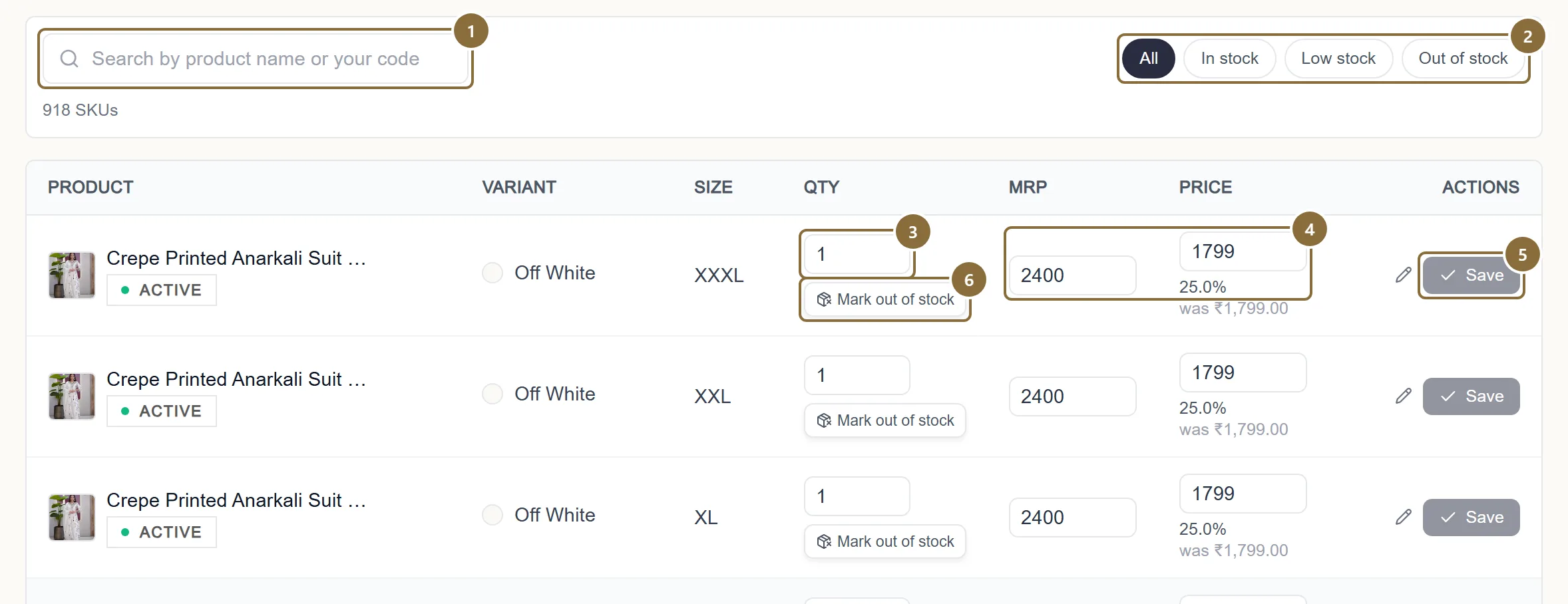
Search
By product name or your style code.
Level pills
All, In stock (more than 5), Low stock (1 to 5), Out of stock (0).
Qty
A whole number from 0 to 1,00,000. The row turns amber while it has unsaved changes.
MRP and Price
At least 1 each, price never above MRP, up to 10,00,000. The Discount column works out the percentage for you.
Save
Only this row, and only the fields you changed. The toast names the SKU it updated.
Mark out of stock
Sets the quantity to 0 after a confirmation. To bring it back, type a new quantity and save.
All Products · row menu · Inventory
One product's inventory
The same editor for a single product, reached from the ⋮ menu on All Products or the Inventory link on the edit page. It also shows each SKU's UPC, the code the courier label and the API use for that exact colour and size.
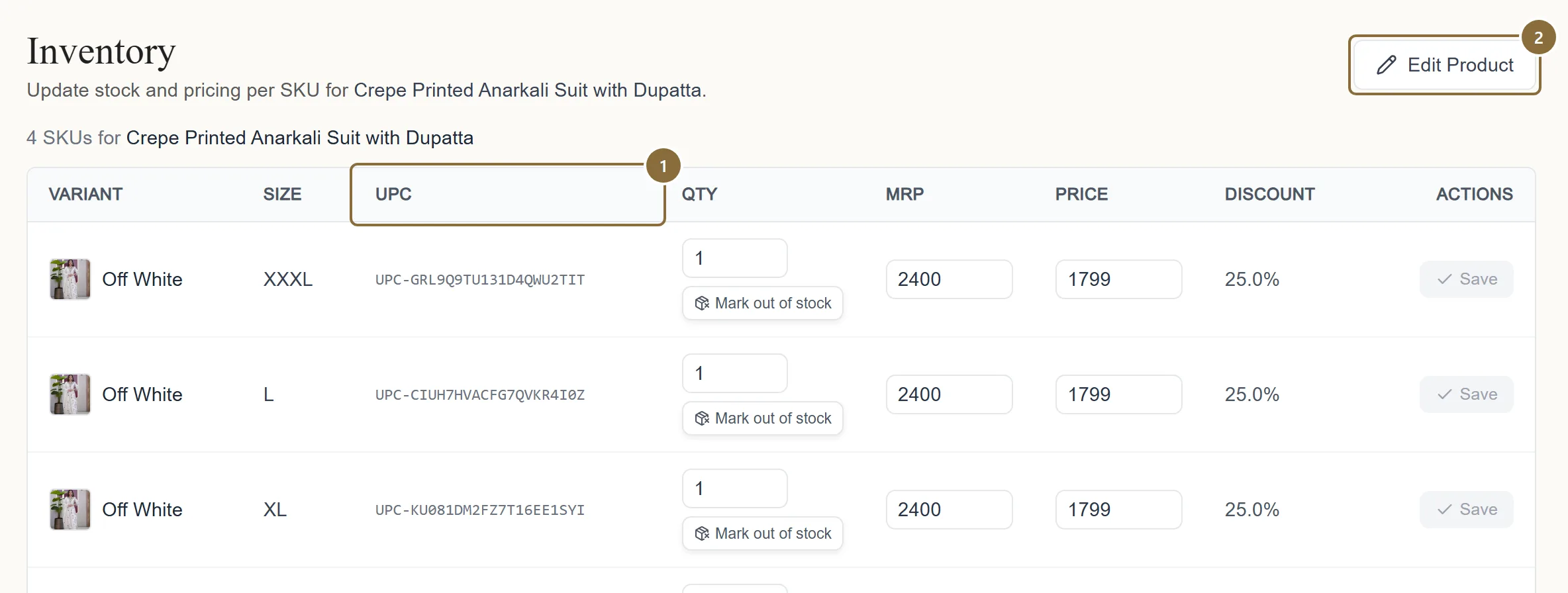
UPC
The SKU code. Quote it in a support ticket about a specific size.
Edit Product
To add a colour or a size; the inventory page only changes quantity and price of what exists.
Products · Low Stock / Out of Stock
Low Stock and Out of Stock
Low Stock lists SKUs with 1 to 5 units left; Out of Stock lists SKUs at zero. Each row has a Restock to box and a Restock button. Once a row no longer belongs on the list it disappears from it as soon as you save.
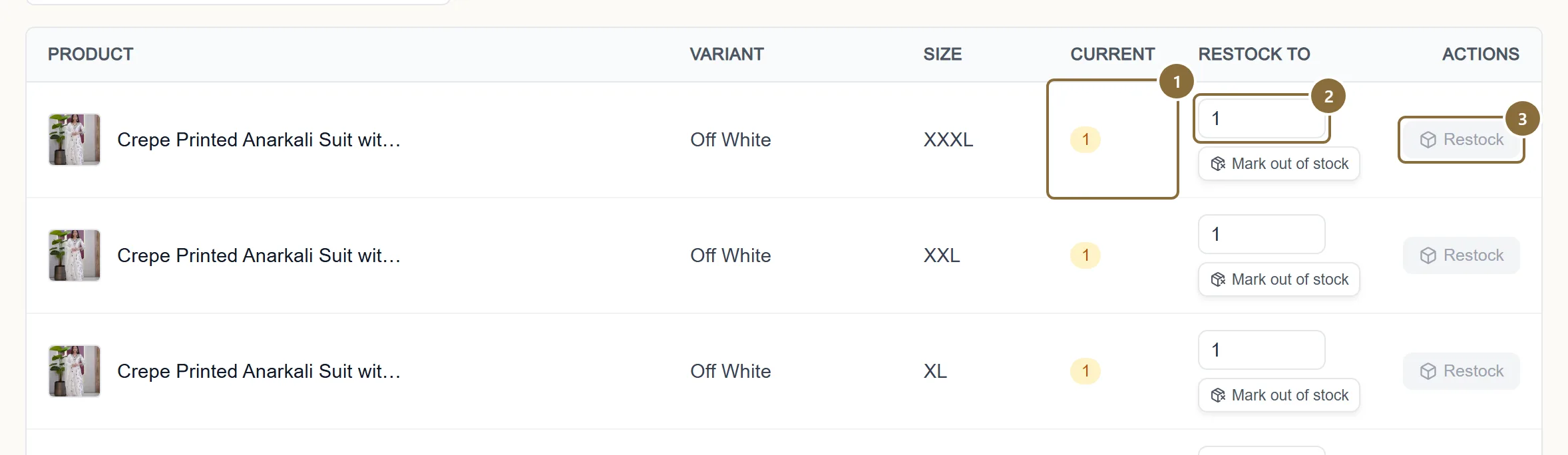
Current
What is left, in amber on Low Stock and red on Out of Stock.
Restock to
The new total, not the amount added.
Restock
Saves that row.
On meradhluxurious.com
What stock does on the store
A size at 0 shows Out of Stock on the product page when the customer selects it, and the Add to bag button is disabled for it. When every size of every colour is at 0 the card shows a Sold Out pill and the product's search listing says out of stock. The product page itself stays up and stays in the sitemap, so a restock brings it straight back.
The dashboard's Out of Stock tile says "Hidden from customers": the piece is not purchasable, though its page remains reachable.
Keep these
Rules and common mistakes
- Stock is the number of pieces you can ship today.
- An order for a size you cannot ship is a cancellation on your record and a refund for the customer.
- Set a size to 0 to stop selling it; do not delete the size.
- 0 is allowed everywhere and keeps the SKU, its UPC and its history. Removing a size is refused while units are reserved for orders.
- Quantity is a whole number, at most 1,00,000.
- Fractions and negatives are refused on the page and again on save.
- Price never above MRP; both at least 1.
- The same rule as on Add Product, checked per row.
- Press Save on every row you changed.
- Rows save one at a time. Leaving the page with amber rows loses those changes.
In short
Questions sellers ask
- Can I set my own low-stock threshold?
- No. Low Stock is fixed at 1 to 5 units.
- Stock changed on its own.
- Orders reserve and deduct stock, and a return restocks the piece when the courier reports it delivered back to you. Every change is logged against the order.
- Can I change stock from the edit page?
- Existing sizes are saved through the inventory endpoint even from there; if a quantity is refused you see an amber "this stock was not changed" note after the product details save.
Related guides
Add a product
The four steps of the Add Product screen: category, details, colours with photos and prices, then review and send for approval.
Edit, clone or retire a product
What you can change on a product in each status, what happens when you save, adding and removing colours and sizes, Copy for a new colourway, and how to stop selling a piece.
From order to pickup
The order pipeline and its tabs, accepting an order and the parcel prompt, the automatic courier booking and label, tracking, cancellations, returns to seller and the invoice.
Returns and exchanges
The return window, the queue, what the customer sends you, approving or rejecting each line, offering an exchange, the reverse pickup, and when the refund reaches the ledger.