

On this page
Before you start
The mobile number you will keep. It is your login and the number the one-time codes go to.
Business details: brand name, legal name, a business email, date of establishment, your GST number and address. An MSME or Udyam number is optional.
Owner's documents as photos or PDFs, each under 5 MB: PAN card, Aadhaar front and back, the GST registration certificate, and a cancelled cheque or bank passbook page that shows the account number, IFSC and account holder's name.
The pickup address the courier will collect from, and the name and number of the person the rider should ask for.
Bank account for payouts: account type, holder's name, account number, bank and IFSC.
Screen 1 of 2 · Create your seller account
Create the account
Open Start selling on the seller landing page, or go straight to the register screen.
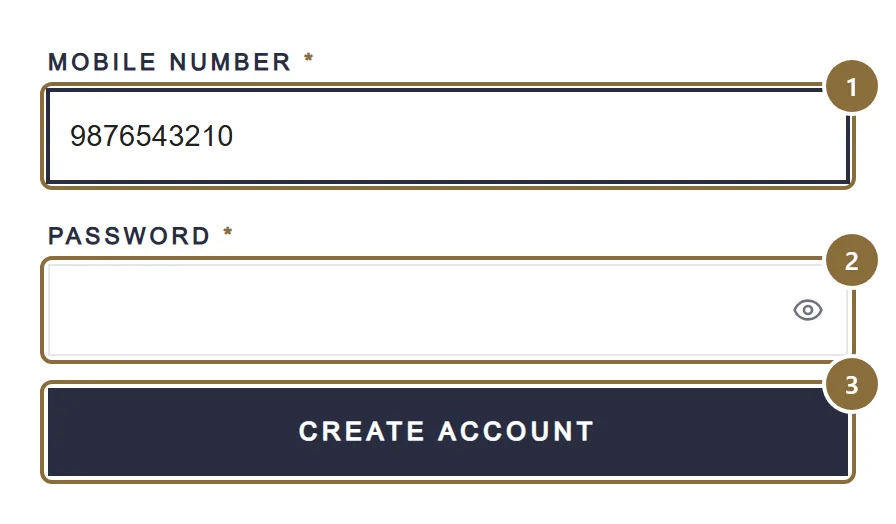
Mobile Number
A 10-digit Indian mobile number starting 6 to 9. One account per number: a number that is already verified is refused with "mobile already exist".
Password
8 to 50 characters with at least one uppercase letter, one lowercase letter, one number and one of ! @ # $ % ^ & *. The eye button shows what you typed.
Create account
Sends a 6-digit code by SMS to the number. The next screen asks for it.
Screen 2 of 2 · Verify
Enter the code
The screen shows the last four digits of your number and six boxes. Type the code or paste it; it moves from box to box by itself. Press Verify My Account.
The code is valid for 10 minutes. After five wrong tries it expires and you need a new one. Resend becomes available after the countdown; there is a short wait between resends and a limit of five an hour.
On success the panel signs you in and opens the verification form. If you close the window before entering the code, sign in later with the same number and password and a fresh code is sent.
Vendor Verification · Step 1 of 4
Verification step 1 — Business
The form says "Complete all 4 steps to submit your account for review." Each step has Back and Next; nothing is sent until you press Submit for review on step 4.
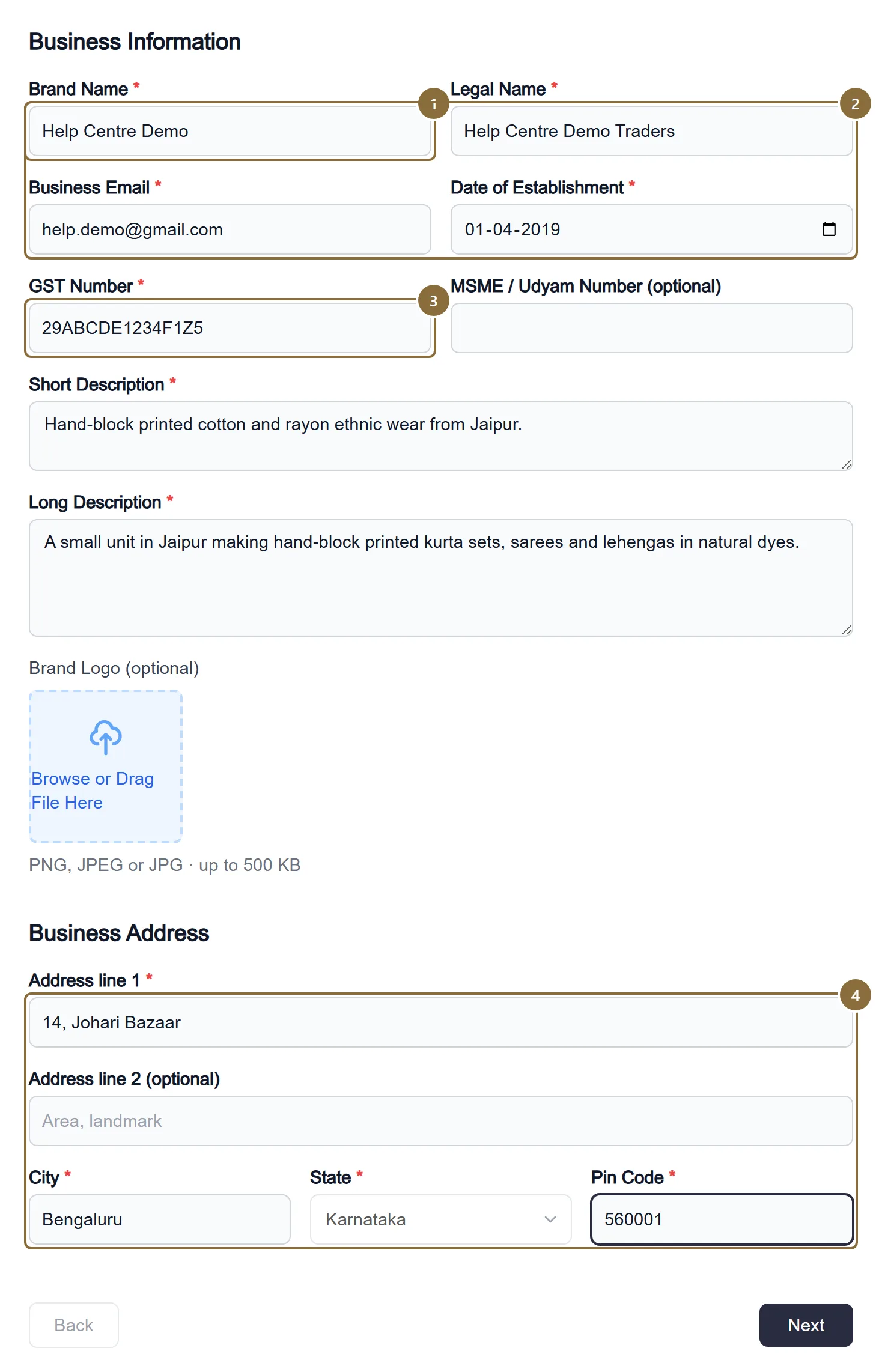
Brand Name
The label customers see on the store. Up to 70 characters, and no two sellers can use the same one.
Legal Name and Business Email
The registered business name and an email we can reach. Business, Gmail and Yahoo addresses are accepted.
GST Number
Your 15-character GSTIN. It is checked for a valid check digit, its state must match the business address state, and it must not already belong to another seller account. The business PAN is read from it.
Business Address
Address line 1 (shop or building number and street), optional line 2, city, state from the list, and a 6-digit pin code.
Vendor Verification · Step 2 of 4
Verification step 2 — Owner and documents
Who owns the business, and the papers behind the numbers.
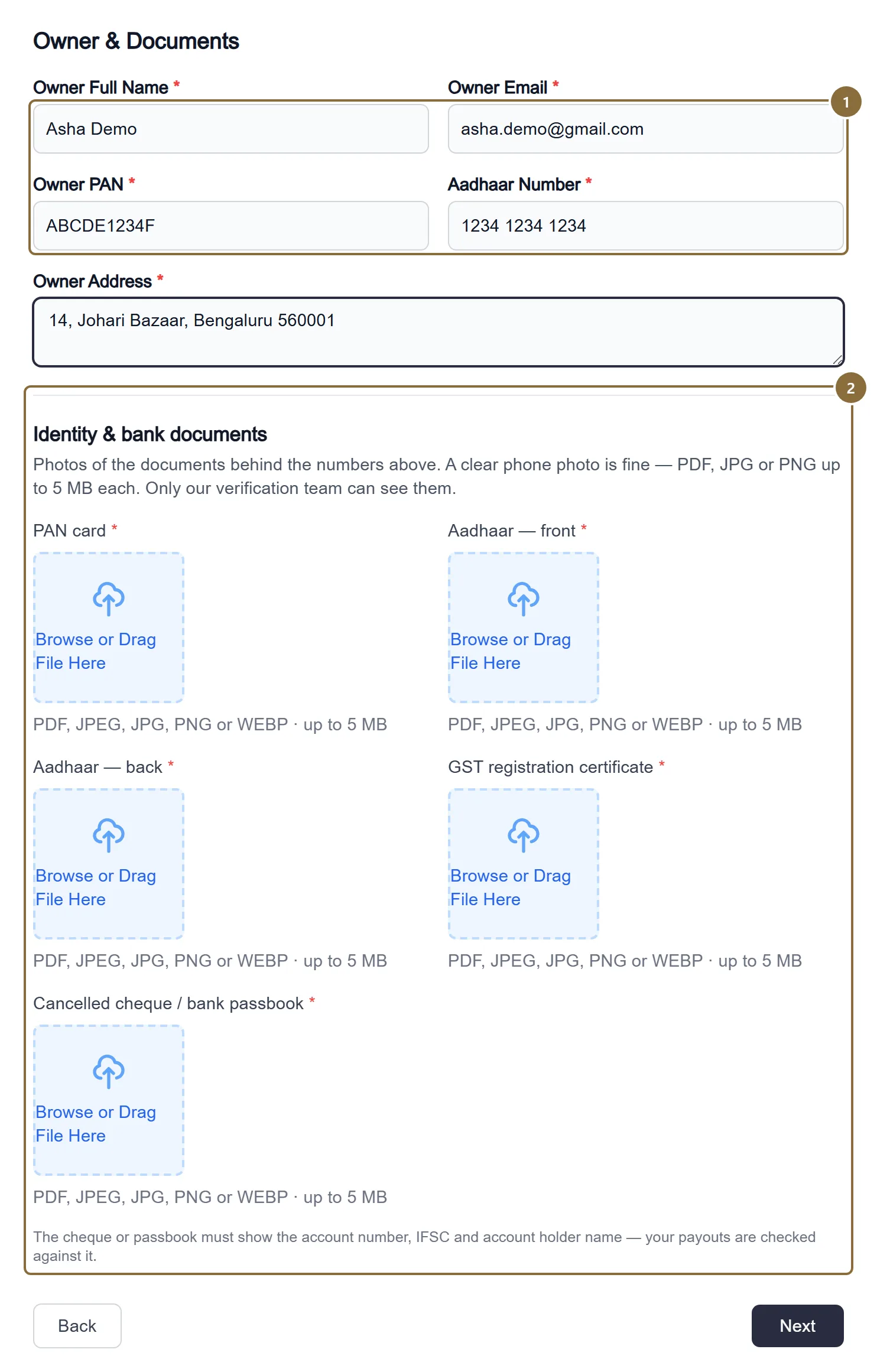
Owner Full Name, Email, PAN, Aadhaar, Address
PAN in the form ABCDE1234F; Aadhaar as 12 digits, spaces and hyphens are removed for you.
Identity & bank documents
Five uploads, all required: PAN card, Aadhaar front, Aadhaar back, GST registration certificate, and a cancelled cheque or passbook page. PDF, JPG, PNG or WEBP, up to 5 MB each. A clear phone photo is fine. Only our verification team can open them.
Vendor Verification · Step 3 of 4
Verification step 3 — Pickup address
Where the courier collects your parcels. Make sure someone is reachable on this number during the day.
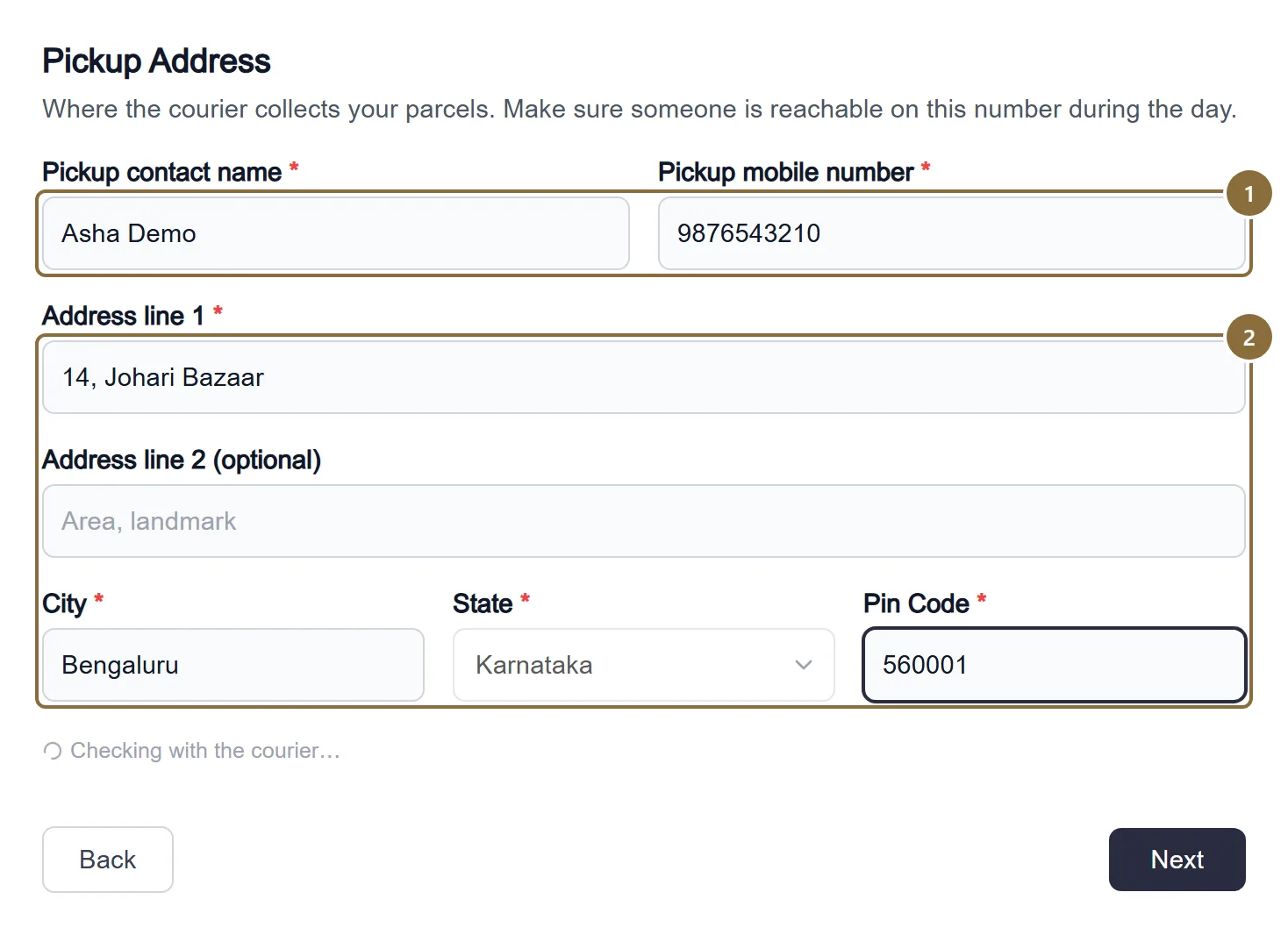
Pickup contact name and mobile
Who the rider should ask for, and the 10-digit number they call.
Address and pin code
Address line 1, optional line 2, city, state and the 6-digit pin code. On submit both this pin code and the business pin code are checked for courier service.
Vendor Verification · Step 4 of 4
Verification step 4 — Bank and consent
The account your settlements are paid into.
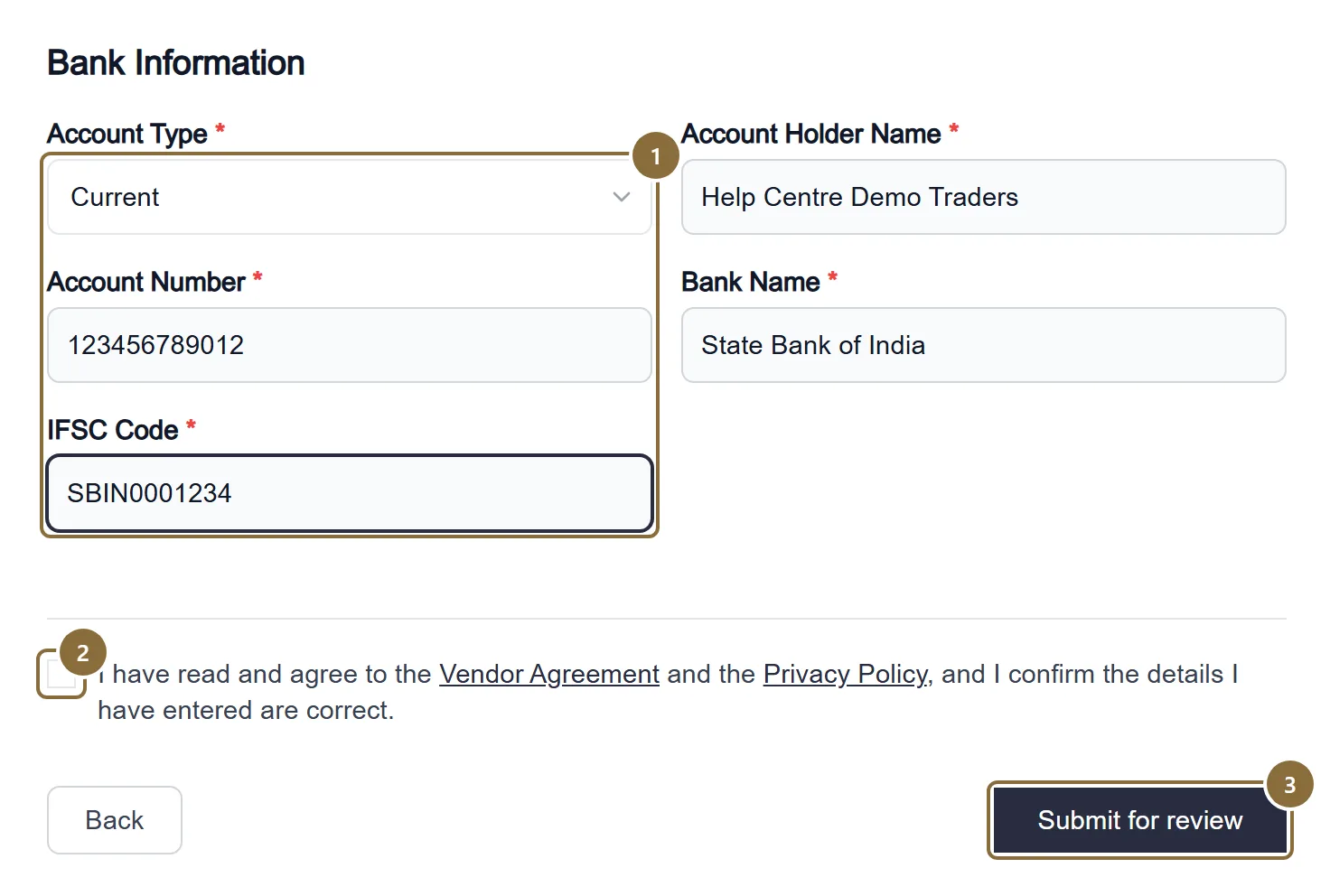
Account Type, Account Holder Name, Account Number, Bank Name, IFSC
Savings or Current; account number of 9 to 18 digits; IFSC in the form AAAA0XXXXXX.
Consent
Tick that you have read the Vendor Agreement and the Privacy Policy and that the details are correct. Both documents are linked beside the box.
Submit for review
Sends everything. The panel confirms: "We have received your information and will review it shortly."
Seller panel · Sign in
Signing in later
The sign-in screen asks for the same mobile number and password.
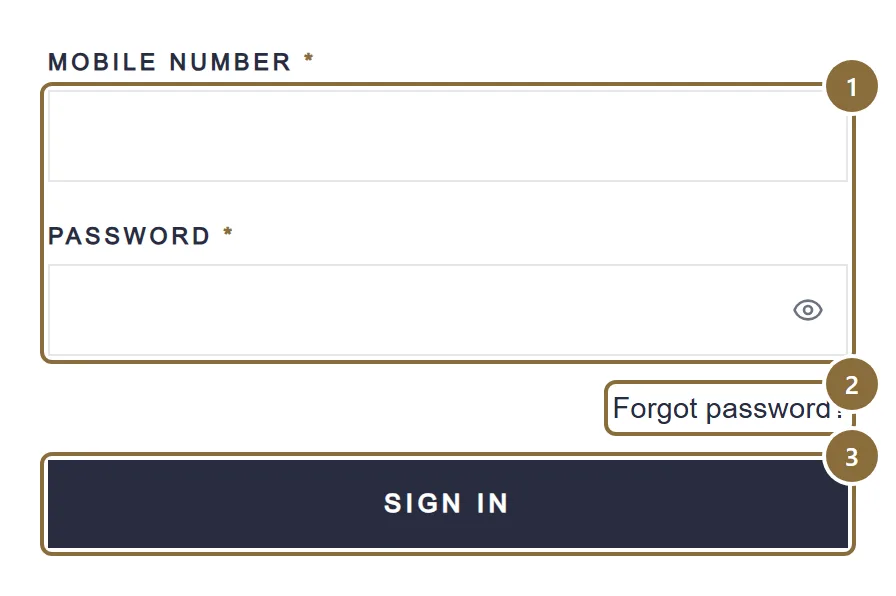
Mobile Number and Password
A wrong pair is answered with "Mobile number or password is wrong."
Forgot password?
Enter the number; a code is sent if the number is registered. On the next screen type the code, a new password and its confirmation. Every other device is signed out when the password changes.
Sign in
An active seller lands on the Dashboard. A seller still in review lands on the verification screen.
Afterwards
What happens next
Under review
The verification screen reads "Your account is under review" and there is nothing to do but wait. You will be notified on your registered email once there is a decision.
Approved
You receive the email "Your seller account has been approved" and the next sign-in opens the Dashboard. The approval also registers your pickup address with the courier; if that did not go through, Add Product shows an amber card with a Register with courier button. Then: check the pickup address, bank details and GSTIN on your Profile, and list your first piece.
Changes requested
The form reopens with the heading "Update your application" and an amber box, "What our team needs from you", with the reviewer's note and a note beside any document that needs attention. Everything you entered is kept; change what is flagged, tick the consent again and submit.
Not approved
The same form, under "Why your application was not approved", with the reason. You can correct and resubmit, or write to [email protected].
Keep these
Rules and common mistakes
- One brand name, one GSTIN, one mobile number per seller account.
- Each is checked for duplicates on submit: "Same brand name not allowed", "That GSTIN is already registered to another seller account", "mobile already exist".
- The GSTIN's state must match the business address state.
- The first two digits of a GSTIN are the state code. A mismatch is refused before review.
- Documents under 5 MB each, as PDF, JPG, PNG or WEBP.
- Larger files are refused by the upload. A clear, well-lit phone photo of the whole document is enough.
- The cheque or passbook must match the bank details you typed.
- Payouts are made to the account on the form and checked against the document. A mismatch holds up your first settlement.
- Keep the pickup number answered during the day.
- It is the number printed for the courier. An unanswered pickup call is a missed pickup.
In short
Questions sellers ask
- Can I change my mobile number or email later?
- Not from the panel. The login mobile number and email are changed through a support ticket so we can verify the request.
- I did not get the code.
- Wait for the countdown and press Resend. Codes come by SMS to the number you typed; check it is the right one. There is a limit of five codes an hour.
- Do I need GST?
- Yes. The form asks for your GST number and the registration certificate; both are required.
Related guides
How selling on Meradh works
Who can sell, the five stages from registration to settlement, what the store does for you at each one, and the few things that stay with you.
Profile and pickup address
The sections of the Profile page, the business name customers see, how a pickup address change is checked with the courier before it is saved, bank details, documents, vacation mode, brands and the agreement.
Add a product
The four steps of the Add Product screen: category, details, colours with photos and prices, then review and send for approval.
Getting help
How to raise a support ticket, what to put in it, following the thread, the three ticket statuses, and the grievance officer route with its timelines.