

On this page
Details tab · Product Name
The product name
Name the piece the way a customer would describe it to a friend: the garment, the fabric, the work, the colour. Between 3 and 200 characters, and no two of your products can share a name.
A good name: Teal Banarasi Silk Saree with Zari Border and Blouse Piece. Another: Maroon Ajrakh Print Rayon Lehenga Choli with Mirror-Lace Dupatta.
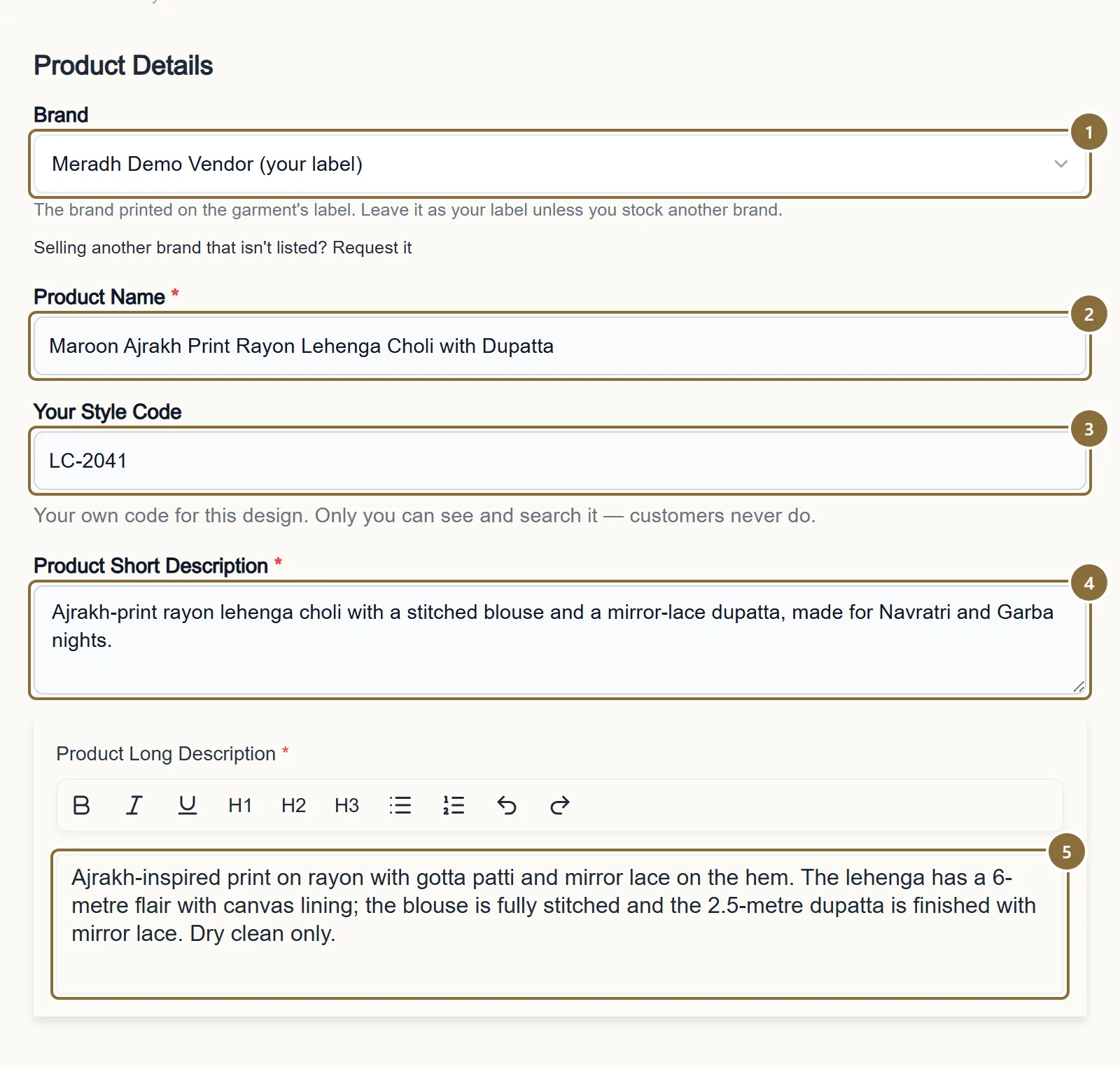
Brand
Your label, or an approved brand you stock. It is printed above the name on the storefront and in front of it in the Google feed, which is why it must not be typed into the name as well.
Product Name
The garment, the fabric, the work, the colour. Nothing else.
Your Style Code
Private. Put your catalogue number here, never in the name.
Product Short Description
At least 10 characters. One or two sentences that say what the piece is and what is included.
Product Long Description
At least 20 characters, ideally 300 or more: fabric, work, what is in the set, measurements that matter (flair, dupatta length), care.
Details tab · Product Name
What never goes in the name
Your brand or label. The storefront prints it above the title already, and the Google feed puts it in front of the title. On 22 October 2026, 36 of 40 Google Shopping disapprovals were six products whose names began with the seller's own brand: Google read the brand twice and flagged the title as "promotional or irrelevant text".
Promotional words: New, Latest, Designer, Premium, Special, Best, Sale, Offer, Free. Google's title policy rejects them; a customer learns nothing from them.
Marketplace jargon and keyword lists: "for Women", "Party Wear Wedding Festive Ethnic", repeated colours, hashtags. One occasion is a specification, not a name.
Codes and your own SKU numbers. They belong in Your Style Code.
Details tab · Product Name
Spelling
Misspelt names are the most common reason a listing is edited after approval, and they hurt search: nobody types the misspelling. These were all found in live titles in October 2026, with the correct form:
Lengha → Lehenga · Rion, Reyon, Reon → Rayon · Winteg → Vintage · Ribin → Ribbon · Ajrak → Ajrakh · Mirar → Mirror · Lass Work → Lace Work · Gotta Patti → Gota Patti · Fox Georgette → Faux Georgette · Sequence Work → Sequins Work.
Read the name once more before you submit. If a word is a trade term you are unsure of, write it the way it is printed on your own label or bill.
What the reviewer checks
Photos and category
Photos of the real piece. Your own photographs, not a supplier's catalogue image and not a reference photo with a watermark. The main photo shows the whole garment, front on. See Product photos.
The right category. A kurta set listed under Sarees is sent back. The category decides the sizes offered and the tax code on the invoice, so a wrong one is a wrong invoice.
Mandatory specifications filled. The category marks the attributes it needs with a red asterisk, Fabric on most; the form will not submit without them.
Price and MRP that make sense. Selling price never above MRP. A price that does not match the piece in the photo is a question from the reviewer.
All Products · Status
What happens at review
A new listing waits as Under Review. The reviewer approves it, or rejects it with a note that you see in red under the status on All Products. A product cannot go live until every photo has finished processing, so a listing submitted a minute ago may show "photos still being processed" to the reviewer for a moment.
Rejected means fix and resave: open the product, change what the note says, save, and it returns to Under Review. Permanently Rejected is final and cannot be edited; it is used for listings the store cannot carry at all.
Keep these
Rules and common mistakes
- Garment, fabric, work, colour. 3 to 200 characters.
- That is the whole name. Shorter names read better on the card, and the part before the first "|" is what is shown as the title.
- No brand in the name.
- The storefront and the Google feed both add it. A repeated brand got 36 products disapproved in one day.
- No New, Latest, Designer, Premium, Special, Sale or similar.
- Google's title policy rejects promotional words, and a leading "New" is stripped from the feed anyway.
- Spell trade terms correctly.
- Lehenga, Rayon, Vintage, Ajrakh, Mirror, Lace, Gota Patti, Faux Georgette, Sequins. Customers search with the correct spelling.
- One product name per design in your catalogue.
- A duplicate is refused on submit. For another colour of the same design, add the colour to the existing product or use Copy; see Edit, clone or retire a product.
- Own photos of the real piece, no watermarks, no catalogue images.
- A photo that is not the garment you ship is a rejection at review and a return upheld later.
- Right category, mandatory specifications filled, price not above MRP.
- The category sets the tax code on the customer's invoice. The form checks the rest before it lets you submit.
In short
Questions sellers ask
- Can I use the same photos on two colours?
- No. Each colour is its own line on the store and needs photos of that colour. A customer who orders Maroon from a picture of Green returns it.
- My brand is not Meradh. Where do I put it?
- In the Brand field above the name. Pick it from the list, or request it with the "Selling another brand that isn't listed? Request it" link. A requested brand cannot be used until it is approved.
- The reviewer's note says the name was changed. Why?
- Small fixes, typically spelling or a brand removed from the name, are made by us so the listing can go live. The note tells you what changed so your next listing does not need it.
Related guides
Add a product
The four steps of the Add Product screen: category, details, colours with photos and prices, then review and send for approval.
Product photos
Formats and size limits, how many photos each colour takes, how the storefront crops them, what to shoot for a saree or a lehenga, and the optional product video.
Edit, clone or retire a product
What you can change on a product in each status, what happens when you save, adding and removing colours and sizes, Copy for a new colourway, and how to stop selling a piece.
Bulk upload from Excel
Download the template for a category, fill one row per size, give image links, upload, and read the result report. Imported products go to review like any other.